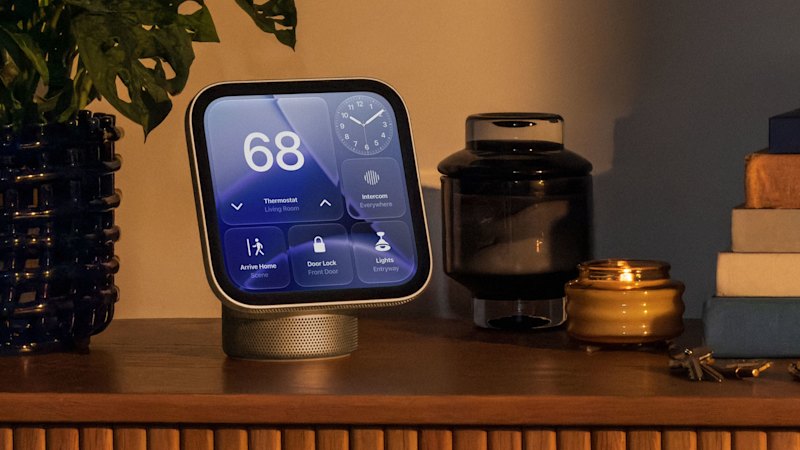
On an unassuming street in Tribeca sits the six-storey loft that Apple calls home in New York City.
asserted
Apple → sit → City
A ceiling of skylights, exposed brick walls and tasteful floral arrangements makes the mansion feel inviting without being overstimulating.
asserted
mansion → expose → skylights
It’s the kind of home most people would look at and think, “Yes, I’d live here”.
asserted
I → ’ → home
This isn’t Apple’s NYC headquarters, but it is where they’ve chosen to unveil their biggest home product in six years: Apple HomeView.
asserted
they → choose → years
The launch marks Apple’s debut into smart display, designed to be a compact, efficient and personal device that makes your home frictionless, allowing you to focus on the things that matter most.
asserted
that → mark → things
Whether you’re trying to spend less time on your phone, constantly bookmarking recipes to test out on friends or live hours away from loved ones, the HomeView was designed with you in mind.
asserted
HomeView → try → mind
The tech giant announced the new product in the early hours of Wednesday morning (AEST), alongside updates to existing devices, the Homepod mini 2 and Apple TV 4K.
HomeView is available for Australians to pre-order today, with prices starting from $449 for the standalone HomeView device and $543.95 for the wall-mounted models.
asserted
prices → announce → models
It will be available to buy from November 13.
asserted
It → buy → November
Arguably late to the game given the launch comes nine years after competitor Amazon first introduced the Amazon Echo Show, Apple have taken the technology further by allowing full integration with your other Apple products.
asserted
Apple → give → products
The personal context provided by your iPhone is key to setting these new smart home products apart from competitors Amazon and Google.
asserted
context → provide → competitors
For this reason, HomeView is best suited to people who already rely heavily on Apple devices, like the iPhone or iPad, as well as anyone who found the original Homepod’s Siri capability lagging and lacking.
asserted
capability → rely → iPhone
Here’s everything you need to know about the Apple HomeView.
asserted
you → ’ → HomeView
HomeView is the new Apple smart home screen product, developed with three main considerations: how we enjoy entertaining, connecting with loved ones and managing the smart home.
asserted
we → develop → home
It’s essentially an extension of your iPhone or iPad, allowing you to keep those devices away while you’re spending time at home.
asserted
you → ’ → home
It features a seven-inch liquid retina display; 12-megapixel centre stage camera, which tracks you as you’re on a call; and four-microphone array system, ensuring crisp and clear audio, while reducing background noise.
asserted
you → feature → noise
Larger than an iPhone but smaller than an iPad, it was designed to be compact enough to blend into your home, but big enough to be used from across the room.
asserted
it → design → room
The display is attached to a domed aluminum base by a stainless-steel hinge that’s adjustable for tabletops of different heights and comes in four different colours: starlight, rose pink, space gray and silver.
asserted
that → attach → colours
There’s also three purpose-built mounts, which are priced depending on the type and are an additional cost on top of $449 for the HomeView: Power Mount USB‑C Wall Connector ($94.95), Power Mount AC Wired ($124.95) and Power Mount PoE Wired ($199.95).
asserted
which → ’ → HomeView
To set up a profile, you need to connect your personal device, such as an iPhone or iPad, along with your Apple account.
asserted
you → set → account
To be able to use the HomeView, your personal device needs to be in the house with you, be connected to the same Wi-Fi and recently unlocked.
asserted
device → use → Fi
When you stand in front of the HomeView screen, it recognises your face and when you swipe up, will automatically take you to your profile, which is fully customisable, in classic Apple style, with various display faces.
asserted
which → stand → faces
Capable of supporting six different profiles, the idea is that everyone in the home can enjoy a uniquely personal HomeView experience.
asserted
everyone → support → experience
What makes HomeView different?
asserted
HomeView → make → ?
Apple is positioning HomeView as singular in the market thanks to how it adapts to each user and essentially functions as an extension of your personal Apple device.
asserted
it → position → device
Through a combination of facial recognition technology and Siri AI (powered by their AI and machine learning system, Apple Intelligence), the HomeView can leverage your iPhone for personal context understanding.
asserted
HomeView → power → understanding
For example, once you’ve unlocked the device, you can ask it to play the song a friend texted you earlier that day; check, update and add appointments; set reminders and continue tasks started on your phone – or vice versa.
asserted
friend → unlock → phone
Home cooks will find it particularly helpful.
asserted
it → find → ?
The HomeView has a designated cooking display that makes following recipes incredibly easy.
asserted
following → have → recipes
Once you’ve found a recipe online, it will grab the relevant details and clearly show the ingredients list and instructions while you cook, integrating other features like the clock to help you manage your time.
asserted
you → find → time
How is your data protected on HomeView?
asserted
data → protect → HomeView
The Apple HomeView runs on the A18 chip with secure exclaves, which is the security technology the company developed to provide added privacy.
asserted
company → run → privacy
With these exclaves, they partition off a secure compartment where the device processes all the data used for recognition and communication.
asserted
device → partition → recognition
Apple, OS and apps aren’t able to access the camera or microphone data captured by the device.
asserted
Apple → access → device
Similarly, like all Apple products, it uses end-to-end encryption, meaning Apple can’t access any of your data.
asserted
Apple → use → data
When you’re using the HomeView, to access your personal content, the device needs to recognise your face and voice.
asserted
device → use → face
If you leave it open on your profile and someone you live with tries to read your text messages, for instance, they won’t be able to because the HomeView will see they aren’t you.
asserted
they → leave → instance
(Additionally, it will send a notification to your phone to verify if you’re the person trying to access the information.)
asserted
you → send → information
If someone else has their profile open, you’ll still be able to use the HomeView for tasks like cooking, playing music or asking general questions, but you won’t be able to access personal content.
asserted
you → have → content
The person who sets up the HomeView has control over what is displayed and can put in place restrictions on apps like Safari and elements like explicit language in music.
asserted
what → set → music
For children under 13, the settings on their personal device will be honoured on the HomeView.
asserted
settings → honour → HomeView
…and 11 more, not listed.
 The Aporia